Every capability.
One connected experience.
Scroll through the NovaDent platform — module by module. Each feature shares the same patient record, permissions layer and reporting engine. Nothing to reconcile. Nothing to duct-tape together.
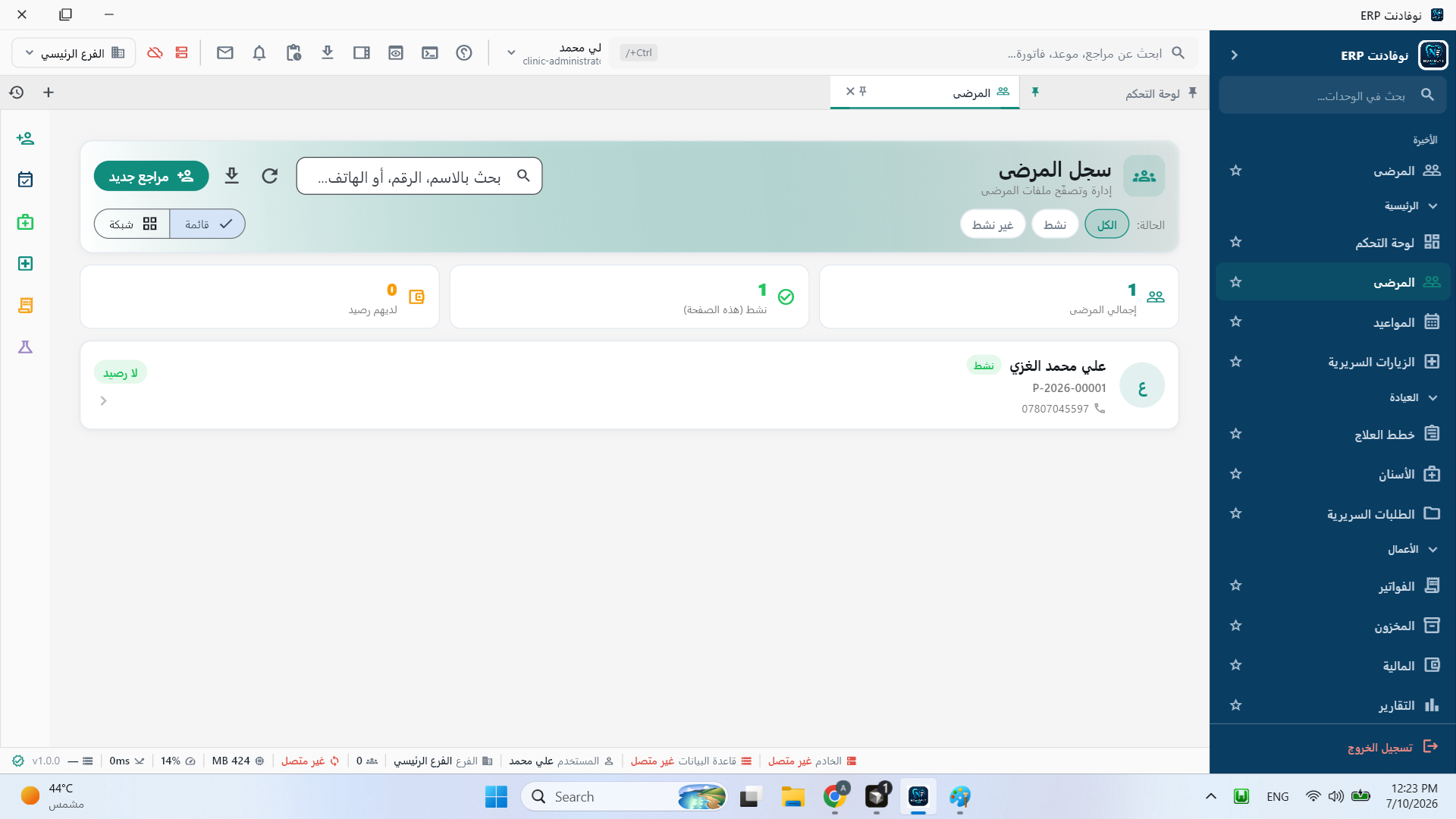
Unified patient profiles with medical history, consent forms, insurance details and family links — accessible instantly across your entire group.
- Complete demographic and clinical history in one view
- Digital consent and document management
- Family accounts and referral tracking
- Instant search across all branches
Scheduling that respects chair time.
Smart calendars with provider availability, operatory assignment, recall automation and no-show prediction — so every chair stays productive.
- Multi-provider and multi-operatory scheduling
- Automated recall and reminder sequences
- Online booking with real-time availability
- No-show risk scoring and waitlist management
Sensitivity on lower right molar
- D2391 Composite — #30 $185
- D1110 Prophylaxis $95
Chairside documentation, done right.
Structured clinical visits with vitals, chief complaint, exam findings, procedures and notes — captured in real time and linked to the patient chart.
- Guided visit templates by specialty
- Procedure logging with fee schedules
- Voice-to-text clinical notes
- Automatic chart and billing sync
Chart at the speed of the exam.
A tooth-by-tooth interface built for chairside speed — findings, conditions, procedures and history in one visual map that clinicians actually enjoy using.
- Full adult and pediatric tooth charts
- Color-coded conditions and procedures
- Periodontal charting and perio exams
- Auto-linked to treatment plans
Plans patients actually approve.
Phase treatment across visits and insurance cycles, present costs clearly, and let patients review and approve plans digitally before work begins.
- Phased, multi-visit treatment plans
- Insurance coverage breakdown per procedure
- Digital patient sign-off and consent
- Case acceptance tracking and analytics
| Procedure | Fee | Ins. | Patient |
|---|---|---|---|
| D2391 Composite #30 | $185 | $148 | $37 |
| D1110 Prophylaxis | $95 | $0 | $95 |
| D0120 Periodic exam | $65 | $52 | $13 |
From procedure to payment. Seamlessly.
Insurance claims, patient invoicing, payment plans and collections — all flowing from completed clinical work without re-entry or reconciliation.
- Automated claim generation and submission
- Patient statements and payment plans
- Multi-currency and tax compliance
- Real-time production and collections reports
Supplies tracked. Shortages prevented.
Real-time stock levels across every operatory and branch, with automatic reorder points, supplier management and usage tied to procedures.
- Multi-location inventory with transfers
- Automatic reorder alerts and PO generation
- Lot tracking and expiry management
- Procedure-linked consumption tracking
Lab cases, tracked end to end.
Submit cases to internal or external labs, track fabrication stages, manage returns and keep patients informed — all from the clinical workflow.
- Digital lab prescriptions and case files
- Stage tracking with partner lab portals
- Shade matching and material specifications
- Patient notification on case completion
Imaging where clinicians need it.
DICOM-compatible imaging stored securely, viewed in-chart alongside the dental chart, with annotations, comparisons and sharing controls built in.
- In-chart X-ray and CBCT viewer
- Side-by-side comparison over time
- Annotation and measurement tools
- Secure sharing with specialists
See the business, not just the schedule.
Production, chair utilization, recall rates, collections and branch comparisons — one reporting layer that gives owners and managers real visibility.
- Real-time production dashboards
- Branch-to-branch performance comparisons
- Provider and operatory utilization metrics
- Exportable owner and investor reports
Automate what slows your team down.
Build visual automation flows for reminders, recalls, approvals, lab follow-ups and internal handoffs — without writing code or hiring consultants.
- Drag-and-drop workflow builder
- Trigger-based automations and escalations
- SMS, email and in-app notifications
- Audit trail for every automated action
Enterprise cloud. Clinic simplicity.
A secure, scalable cloud infrastructure with automatic updates, encrypted backups, 99.9% uptime SLA and access from any device, anywhere.
- Zero-maintenance cloud hosting
- Automatic updates with zero downtime
- Encrypted backups and disaster recovery
- HIPAA-ready security and compliance
One group. Many locations. Full visibility.
Manage multiple clinics from a single control panel — shared patient records, centralized reporting, cross-branch scheduling and unified inventory.
- Centralized dashboard across all branches
- Cross-branch patient lookup and scheduling
- Consolidated financial reporting
- Branch-level permissions and roles
Isolated tenants. Shared infrastructure.
Enterprise-grade tenant isolation with separate data, branding and configuration per organization — on a single scalable platform.
- Complete data isolation per tenant
- Custom branding and white-label options
- Per-tenant configuration and feature flags
- Centralized platform administration
Native speed. Cloud power.
A dedicated Windows desktop client for front-desk and clinical workstations — with offline resilience, hardware integration and instant launch.
- Native Windows application with auto-update
- Offline mode with automatic sync
- Scanner, printer and card reader integration
- Faster performance for high-volume clinics
Intelligence built into every workflow.
AI-powered scheduling optimization, predictive no-show detection, smart charting assistance and production forecasting — coming to NovaDent.
- Predictive no-show and recall scoring
- AI-assisted charting and coding suggestions
- Production and revenue forecasting
- Natural language clinical search
Experience NovaDent in action.
Book a personalized demo, talk to our sales team, or download the desktop client and explore the platform yourself.